In my last post, I added the ability to add recipes through the frontend of the app. However, the recipes could not be modified; the ingredients that were found were purely at the discretion of the (still a bit clunky) recipe parser. It was time to change that.
However, this proved to be a bit more difficult than I thought, and required me to make some changes to the backend database.
Changing the Backend
Recall that the backend keeps track of the ingredients in a recipe by storing an association table between the individual recipe lines and the ingredients. However, this table does not store the actual locations of the ingredients in the line. This was a problem I was aware of when I first designed the database, but I figured I would fix it when it came time to implement it. Well, that bill has come due.
I tried a few different solutions, but ultimately I decided to just store the actual location of the ingredient in the line, rather than do some kind of fancy regex matching that would probably break really fast. This felt like the more robust solution.
Of course, it required me to add a new class to my backend database. Whereas before, a simple association table could keep track of the connections between ingredients and lines, now that additional data was needed, it was time to upgrade that table to a proper model.
# Represents an association between an ingredient and a recipe line
class LineIngredientAssociations(db.Model):
    __tablename__='line_ingredient_associations'
    id_ = db.Column(db.Integer, primary_key=True)  # separate because ingredient could appear more than once in a line
    ingredient_id = db.Column(db.ForeignKey('ingredient.id'))
    recipeline_id = db.Column(db.ForeignKey('recipe_line.id'))
    relevant_tokens = db.Column(db.String(), nullable=False)
    ingredient = db.relationship("Ingredient", back_populates='recipe_lines')
    recipe_line = db.relationship("RecipeLine", back_populates='ingredients')

    # TODO: Create a validator to confirm that the ingredient is on the recipe line

    def __repr__(self):
        return f"<Association of {self.ingredient} with {self.recipe_line} at {self.relevant_tokens}>"
The key thing to note here is the relevant_tokens column, which stores a string containing the start and end point of the ingredient. This is initially determined by spaCy, as we’ll see in a moment. Also note that I put a TODO in to create a new validator to confirm that the location in question does indeed have the ingredient in question. To be honest, I’m not actually sure if that’s a good idea, because I worry that it would disrupt a certain amount of flexibility in how I design these associations. But I’m going to keep that in there as a reminder to myself to come back to this later.
Next, I created a new schema for the table, and nested it inside of the RecipeLineSchema. This way, it serves as a sort of “middle man” between the RecipeLine and Ingredient objects, and the necessary data is added as a new layer when a Recipe is requested.
class RecipelineIngredientAssociationSchema(ma.SQLAlchemyAutoSchema):
    class Meta:
        model = LineIngredientAssociations
        include_fk = True

    ingredient = fields.Nested(IngredientSchema)

    @post_load
    def make_association(self, data, ** kwargs):
        new_association = LineIngredientAssociations(** data)
        return new_association

    @post_dump
    def convert_token_string_to_list(self, data, ** kwargs):
        data["relevant_tokens"] = json.loads(data["relevant_tokens"])
        return data
This is essentially exactly what I’ve done for the other models, so I’m not going to spend too much time explaining this. The only thing to really note here is the @post_dump call, which uses json.loads() to convert the string value of the start and end points to a list value. That’s because the list is stored as a string in the database, but the frontend needs it as a list (or at least, it would prefer it as such).
Then, I modified my natural language processing function to record the start and end points of the identified token. This was easy, as spaCy already keeps track of this.
def determine_ingredients_in_line(recipe_dict):
    print("determining ingredients")

    recipe_lines_with_ingredients = []

    for line in recipe_dict["recipe_lines"]:
        current_recipe_line = {
            "text": [],
            "ingredients": []
        }
        print(line)
        line_nlp = nlp(line)

        current_recipe_line["text"] = json.dumps([token.text for token in line_nlp])
        print(current_recipe_line["text"])

        for ent in line_nlp.ents:
            print("entity:", ent)
            if (ent.label_ == "INGREDIENT"):
                current_recipe_line["ingredients"].append({
                    "ingredient": {"name": ent.text},
                    "relevant_tokens": json.dumps((ent.start, ent.end))
                })
        recipe_lines_with_ingredients.append(current_recipe_line)

    recipe_with_ingredients = recipe_dict
    recipe_with_ingredients["recipe_lines"] = recipe_lines_with_ingredients

    return recipe_with_ingredients
One other thing to note here is that I changed what the “text” field stores. Rather than storing the plain text of the line, it stores spaCy’s tokenized version as a string. This is because I need the frontend to know exactly how the words are tokenized; using some other way to split the text in the frontend (such as a .split() call) would result in a differently parsed line, and the extra information I’m storing would be useless.
Similarly to my new schema, I use json.loads() to turn the string version of the list into a proper list when I return the RecipeLine to the frontend.
@post_dump
 def convert_string_to_list(self, data, ** kwargs):
     print("postdump data:", data)
     data["text"] = json.loads(data["text"])

     return data
And that’s pretty much everything for the backend. This may need to be tweaked at some point, but for now I’m just happy that I wrote code that I can still understand and modify months later.
The New Recipe Page
Now, it’s time to return to the world of React and make use of this new data. First, I created a new page for viewing and editing recipes. This page first requests the recipe from the backend (using the parameters from the route and the useParams() hook). It then passes them down to a RecipePanel component.
const EditRecipePage = () => {
  const [recipe, setRecipe] = useState({})
  const token = useSelector(store=>store.token)
  const {recipeId} = useParams()

  const getRecipeFromBackend = () => {
    fetch(`/recipes/${recipeId}`)
    .then(response=>response.json())
    .then(json=>setRecipe(json))
  }

  useEffect(()=>{
    getRecipeFromBackend()
  }, [])


  return (
    <MainTemplatePage noSearchbar>
      <TopSquiggle>{recipe ? recipe.name : null}</TopSquiggle>
      <RecipePanel lines={recipe.recipe_lines}/>
    </MainTemplatePage>
  )
}

export default EditRecipePage
The RecipePanel component holds a list of RecipeLine components, which themselves are lists of IngredientButton components.
const RecipePanel = (props) => {
  const classes = useStyles()

  console.log(props.lines)

  return (
    <Box className={classes.root}>
      <List>
        {props.lines ?
          props.lines.map((line, index)=><RecipeLine key={index} line={line} />)
          : null}
      </List>
    </Box>
  )
}

// In a different file:

const RecipeLine = (props) => {
  const classes = useStyles()
  const {ingredients, text} = props.line
  console.log(ingredients)
  return (
    <ListItem className={classes.root}>
      {text.map((word, index)=>{
        if(ingredients[0] !== undefined){
          if(index >= ingredients[0].relevant_tokens[0] && index < ingredients[0].relevant_tokens[1]){
            return <IngredientButton key={index} text={word} ingredient/>
          }
        }
        return (
          <IngredientButton key={index} text={word}/>
        )}
      )}
    </ListItem>
  )
}
As you can see, the RecipeLine component is the one that is (so far) doing most of the heavy lifting. It receives both the tokenized text of the line and the relevant_tokens property, which tells it where each ingredient is in the line. Then, in the .map() call to the text variable, it checks if the index of each word falls in the range specified by relevant_tokens. If so, it renders the component with the “ingredient” tag, in an admittedly inefficient way. But I was just trying to get proof of concept for now. And get proof of concept I did.
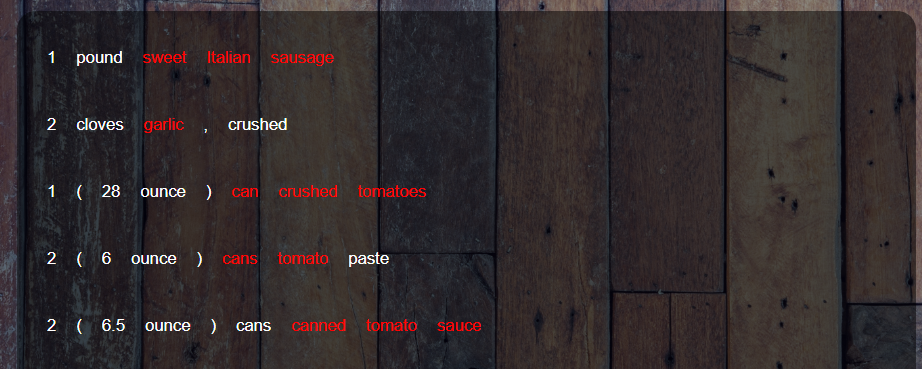
(For reference, the “ingredient” tag just makes the text of the button red).
And there you have it! The frontend now knows both the ingredient and where it is. Of course, there’s still a lot to do here; this code is very janky and only works for the first ingredient in a line, and I need to add colors and the ability to change them. But I’m very pleased with this solution; it was one of the problems I was worried about when it came time to work on the frontend, and I feel much better about my progress on this project now that I have a working solution.
Next Steps
- support multiple ingredients on a line
- change ingredients in line
- make everything look better