My next goals involved creating a better user experience, and to do that I needed a place where the user could edit and alter their information. In essence, I needed a settings page. I started by creating a new template, inserting the basic user information, as well as two buttons: one to change user information (such as username or email) and one to change the user’s password.
{% extends 'layout.html' %}

{% block content %}
<div class="card mt-3">
    <div class="card-header">
        <h5>Account Information</h5>
    </div>
    <div class="card-body">
        <p>Username: {{current_user.username}}</p>
        <p>Email: {{current_user.email }}</p>
        <button class="btn btn-primary">Edit Information</button>
        <button class="btn btn-secondary">Reset Password</button>
    </div>
</div>
{% endblock content %}
I then created a new route for the template…
@account.route('/settings')
def settings():
    return render_template('settings.html')
…and a new link on the navbar for my page:
<li class="nav-item"><a class="nav-link" href="{{ url_for('account.settings') }}">Settings</a></li>And a simple, basic settings page was born.
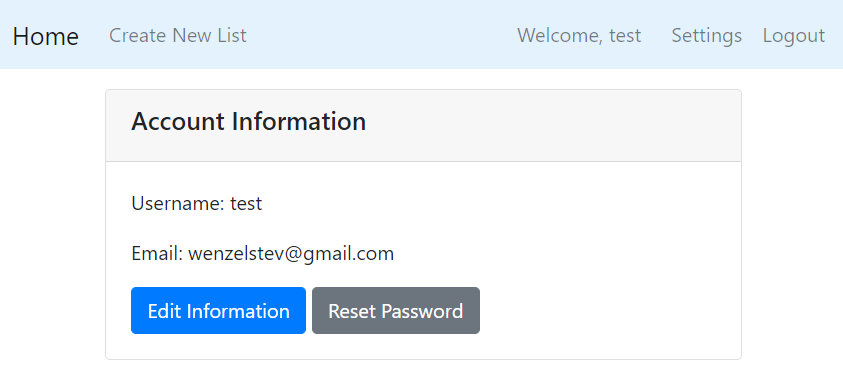
Now, I needed to make the buttons work. First, I created a new form for editing the user’s information. I needed to make a new form because my previous register form had a DataRequred() validator, so all information had to be included for it to work.
I created two new forms, one for editing the username and email, and the other for changing the password.
class EditForm(FlaskForm):
    username = StringField("Username: ")
    email = StringField("Email: ", validators=[Email()])
    submit = SubmitField("Submit Changes")

class ChangePasswordForm(FlaskForm):
    old_password = PasswordField('Old Password', validators=[DataRequired()])
    new_password = PasswordField('New Password', validators=[DataRequired()])
    new_password_confirm = PasswordField('Confirm New Password', validators=[DataRequired(), EqualTo('new_password')])
    submit = SubmitField('Change Password')
I started with the EditForm, since it seemed slightly more straightfoward to me. I passed the form into the route, and wrote the code to update the username and email, first checking to make sure that the username or email had not already been taken by a different account.
@account.route('/settings', methods=['GET', 'POST'])
def settings():
    edit_form = EditForm()
    if edit_form.validate_on_submit():
        print('form validated')
        user = User.query.get(current_user.id)
        try:
            user.username = edit_form.username.data
            db.session.commit()
        except exc.IntegrityError as error:
            db.session.rollback()
            flash('That username has already been taken.', 'danger')
            return redirect(url_for('account.settings'))

        try:
            user.email = edit_form.email.data
            db.session.commit()
        except exc.IntegrityError as error:
            db.session.rollback()
            flash('That email is in use for another account.', 'danger')
            return redirect(url_for('account.settings'))

        flash('account updated successfully!', 'success')
        return redirect(url_for('account.settings'))

    edit_form.username.data = current_user.username
    edit_form.email.data = current_user.email

    return render_template('settings.html', edit_form=edit_form)
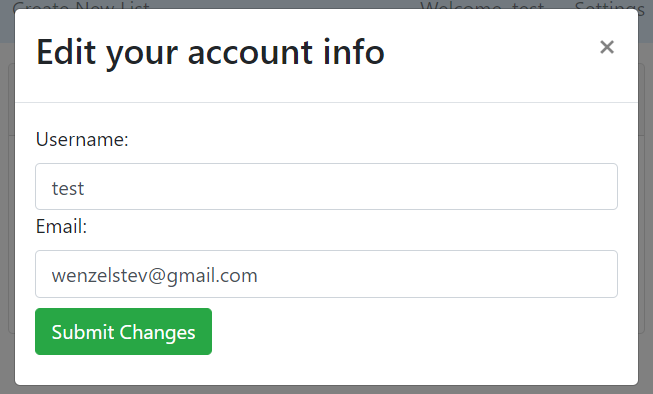
I then decided to add the information via my favorite feature, the modal. I’ve shown a lot of modals on this blog so far, so I’ll spare the reader the agony of looking through anymore versions of what is essentially the same piece of code. In a nutshell, I took the modal html from my list page and inserted my new EditForm into it:
Then, it was time to write the logic for changing the password. I added my ChangePasswordForm to the Settings route, and wrote code to first ensure that the user’s password was correct, before hashing their new password and storing the new hash as the password.
if password_form.validate_on_submit():
    if bcrypt.check_password_hash(current_user.password, password_form.old_password.data):
        if password_form.new_password.data == password_form.old_password.data:  # can't change password if it's the same
            flash('Your new password must be different than your old one.', 'danger')
            return redirect(url_for('account.settings'))
        else:
            current_user.password = bcrypt.generate_password_hash(password_form.new_password.data).decode('utf-8')
            db.session.commit()
            flash('Your password has been changed successfully!', 'success')
            return redirect(url_for('account.settings'))
    else:
        flash('The password you entered does not match our records.', 'danger')
        return redirect(url_for('account.settings'))
Then in inserted the information into a second modal:
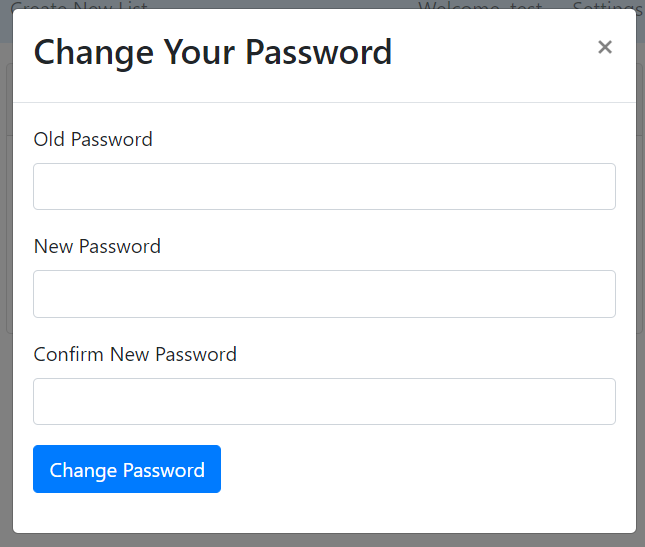
Now the user had the ability to change their email, username, and password at will. One thing I might want to add in the future is a verification check if the user wants to change their email, but I’m satisfied with this as a first pass for now.
But another question remains: it’s great if the user can change their password when logged in, but what if the user forgets their password? Most web apps have the ability to allow a user to reset their password if they have their email address, so I wanted to add that in as well.
Creating a Reset Password Function
As is customary with my Flask knowledge, I used Corey Schafer’s tutorial set as my starting point. In particular, this tutorial was what I followed to get my reset password functionality working.
First, I created two new forms, one for sending the email, and one for creating the new password:
class ResetRequestForm(FlaskForm):
    email = StringField("Email: ", validators=[Email()])
    submit = SubmitField("Request Password Reset")


class ResetPasswordForm(FlaskForm):
    password = PasswordField('Password', validators=[DataRequired()])
    confirm_password = PasswordField('Confirm Password', validators=[DataRequired(), EqualTo('password')])
    submit = SubmitField('Reset Password')
I then created two new routes, one for sending the reset request, and one for after the token was created.
@account.route("/reset_password", methods=['GET', 'POST'])
def reset_request():
    if current_user.is_authenticated:
        return redirect(url_for('main.home'))

    reset_form = ResetRequestForm()
    if reset_form.validate_on_submit():
      pass

    return render_template('reset_request.html', reset_form=reset_form)


@account.route("/reset_password/<token>", methods=['GET', 'POST'])
def reset_token(token):
    if current_user.is_authenticated:
        return redirect(url_for('main.home'))

    reset_form = ResetPasswordForm()
    if reset_form.validate_on_submit():
        pass

    return render_template('reset_token.html', reset_form=reset_form)
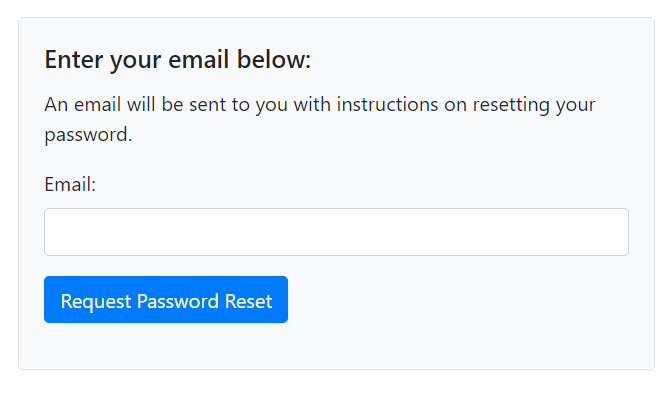
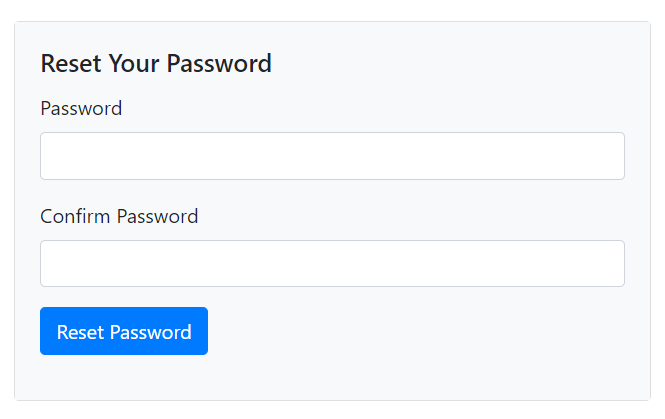
Each of these got a new template, where I built the forms using the same method I’d built all the rest: copious use of Bootstrap’s cards class, with checks to show any information if the user entered invalid data. For demonstration sake, here’s the code for the reset form; the password changing form code looks much the same.
<div class="card mt-4">
    <div class="card-body bg-light">
        <h5 class="card-title">Enter your email below:</h5>
        <p class="card-text">An email will be sent to you with instructions on resetting your password.</p>
        <form method="POST" action="">
            {{ reset_form.hidden_tag() }}
            <div class="form-group">
                {{ reset_form.email.label(class='form-control-label') }}
                {% if reset_form.email.errors %}
                {{ reset_form.email(class='form-control is-invalid') }}
                <div class="invalid-feedback">
                    {% for error in reset_form.email.errors %}
                    <span>{{ error }}</span>
                    {% endfor %}
                </div>
                {% else %}
                    {{ reset_form.email(class='form-control') }}
                {% endif %}
            </div>
            <div class="form-group">
                {{ reset_form.submit(class='btn btn-primary') }}
            </div>
        </form>
    </div>
</div>
The Email Reset Page
The Reset Password Page
This was all very good, but the program still didn’t actually have any functioning logic. To change that, I first went into my models.py file, and added two new functions to the User model: one to create the token, and one to verify it. Both made use of the itsdangerous module. The token itself is set to expire after an hour.
from itsdangerous import TimedJSONWebSignatureSerializer as Serializer

...

def get_reset_token(self, expires_sec=1800):
    s = Serializer(current_app.config['SECRET_KEY'], expires_sec)
    return s.dumps({'user_id': self.id}).decode('utf-8')

@staticmethod
def verify_reset_token(token):
    s = Serializer(current_app.config['SECRET_KEY'])
    try:
        user_id = s.loads(token)['user_id']
    except:
        return None

    return User.query.get(user_id)
Then I created a new utils.py file for my account package. Here, I wrote a function that would send the email to the user.
def send_reset_email(user):
    token = user.get_reset_token()
    msg = Message('Password Reset Request', sender='groceryapp5@gmail.com', recipients=[user.email])
    msg.body = f'''To reset your password, visit the following link:
                    {url_for('account.reset_token', token=token, _ external=True)}
                    If you did not make this request, please ignore this email. '''

    mail.send(msg)
Then, back in my routes file, I first wrote the information that would send the email in the reset_request route. It did this by checking if the entered email was in fact associated with an account, and sending the email if so. If not, it flashed a message that the email was not associated with the account, and reset the page.
# in reset_request function
if reset_form.validate_on_submit():
    user = User.query.filter_by(email=reset_form.email.data).first()
    if not user:
        flash('Error: no account associated with this email. ', 'danger')
        return redirect(url_for('account.reset_request'))
    send_reset_email(user)
    flash('An email has been sent with instructions to reset your password.', 'success')
    return redirect(url_for('account.login'))
Then, in the reset_token route, I check that the token is correct and, if so, allow the user to change their password:
# in reset_request function
user = User.verify_reset_token(token)
if not user:
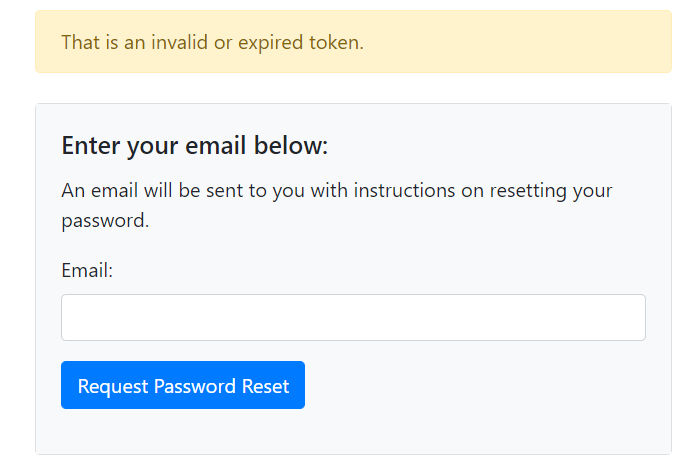
    flash('That is an invalid or expired token.', 'warning')
    return redirect(url_for('account.reset_request'))
reset_form = ResetPasswordForm()
if reset_form.validate_on_submit():
    hashed_password = bcrypt.generate_password_hash(reset_form.password.data).decode('utf-8')
    user.password = hashed_password
    db.session.commit()
    flash('Your password has been updated!', 'success')
    return redirect(url_for('account.login'))
To test that it would not use an invalid token, I specifically messed up the token to see if I would get the flashed message, and I did:
Whew, that was quite a lot this time, but I’m getting very, very close to feature completeness. Once I add in the last few features for accounts, I plan to go back through and start tackling the laundry list of bugs and quality-of-life issues that I have. But this is starting to feel like the final stretch.
Next Steps
- requirements for passwords
- prevent others from being able to edit a list
- copy another’s list for editing